---
title: Add loyalty points as external payment method
description: Steps to configure the loyalty program in Mews, enabling members to use bonus points as an external payment method.
---
[Skip to content](https://support.loyco.io/knowledgebase/add-loyalty-points-as-external-payment-method#main-content)
[](https://support.loyco.io/knowledgebase?hsLang=en)
- [Support](https://support.loyco.io/knowledgebase/contact-us)
Show submenu for Support
- [Book a meeting](https://support.loyco.io/knowledgebase/book-meeting)
- [Contact us](https://support.loyco.io/knowledgebase/contact-us)
- [Program settings](https://www.loyco.io/onboarding)
Open main navigation
Close main navigation
- [Support](https://support.loyco.io/knowledgebase/contact-us)
Show submenu for Support
- [Book a meeting](https://support.loyco.io/knowledgebase/book-meeting)
- [Contact us](https://support.loyco.io/knowledgebase/contact-us)
- [Program settings](https://www.loyco.io/onboarding)
- [Admin login](https://auth.loyco.io/Identity/Account/Login)
[Admin login](https://auth.loyco.io/Identity/Account/Login)
\_
- There are no suggestions because the search field is empty.
1. [Loyco](https://support.loyco.io/knowledgebase?hsLang=en)
2. [Mews](https://support.loyco.io/knowledgebase/mews?hsLang=en)
3. [Setup & configuration](https://support.loyco.io/knowledgebase/mews?hsLang=en#setup-configuration)
# Add loyalty points as external payment method
## Steps for administrators to enable members to pay with bonus points in Mews.
To let members pay with bonus points, the loyalty program must be added as an external payment method in Mews.
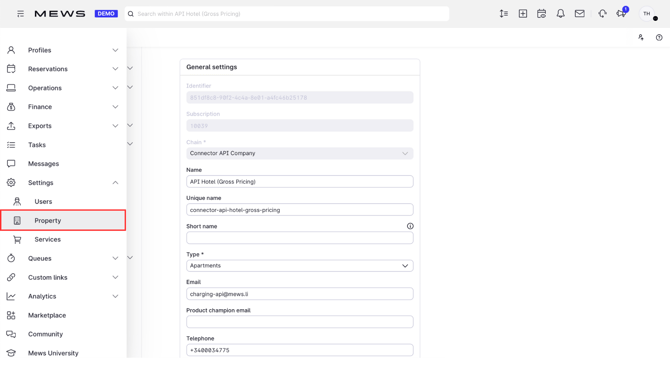
**1. Open Property settings**
In Mews, click **Property**.
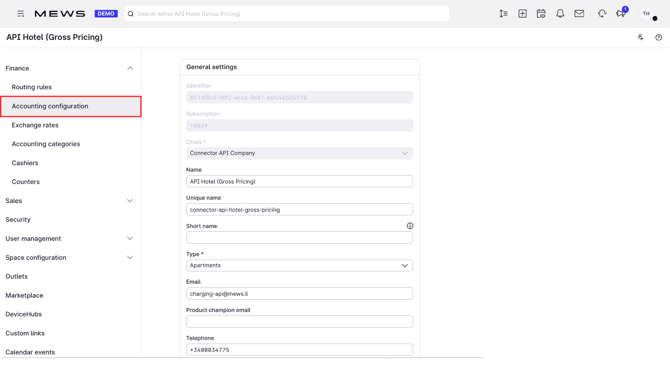
**2. Go to accounting configuration**
Click **Accounting configuration**.
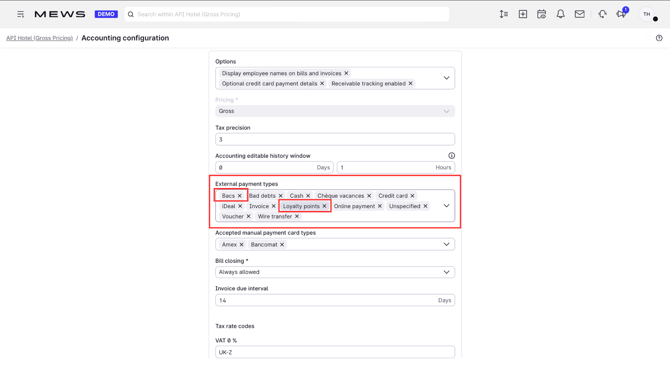
**3. Enable the payment methods**
Make sure both **Loyalty points** and **Bacs** are enabled.
**Good to know**
- Both Loyalty points and Bacs must be enabled for point redemption to work. If either is off, members cannot pay with points at the front desk.
- Once enabled, loyalty points appear as a selectable external payment method when settling a bill.
[](https://loyco.io)
[mailto:support@Loyco.no](mailto:support@Loyco.no)