---
title: Applying member rates for walk-in, phone, or email reservations
description: How receptionists can review guest profiles and apply standard or member rates for walk-in, phone, or email reservations.
---
[Skip to content](https://support.loyco.io/knowledgebase/applying-member-rates-for-walk-in-phone-or-email-reservations#main-content)
[](https://support.loyco.io/knowledgebase?hsLang=en)
- [Support](https://support.loyco.io/knowledgebase/contact-us)
Show submenu for Support
- [Book a meeting](https://support.loyco.io/knowledgebase/book-meeting)
- [Contact us](https://support.loyco.io/knowledgebase/contact-us)
- [Program settings](https://www.loyco.io/onboarding)
Open main navigation
Close main navigation
- [Support](https://support.loyco.io/knowledgebase/contact-us)
Show submenu for Support
- [Book a meeting](https://support.loyco.io/knowledgebase/book-meeting)
- [Contact us](https://support.loyco.io/knowledgebase/contact-us)
- [Program settings](https://www.loyco.io/onboarding)
- [Admin login](https://auth.loyco.io/Identity/Account/Login)
[Admin login](https://auth.loyco.io/Identity/Account/Login)
\_
- There are no suggestions because the search field is empty.
1. [Loyco](https://support.loyco.io/knowledgebase?hsLang=en)
2. [Mews](https://support.loyco.io/knowledgebase/mews?hsLang=en)
3. [Using Loyco in Mews](https://support.loyco.io/knowledgebase/mews?hsLang=en#using-loyco-in-mews)
# Applying member rates for walk-in, phone, or email reservations
## Steps for receptionists to check membership and apply the correct member rate when booking manually in Mews.
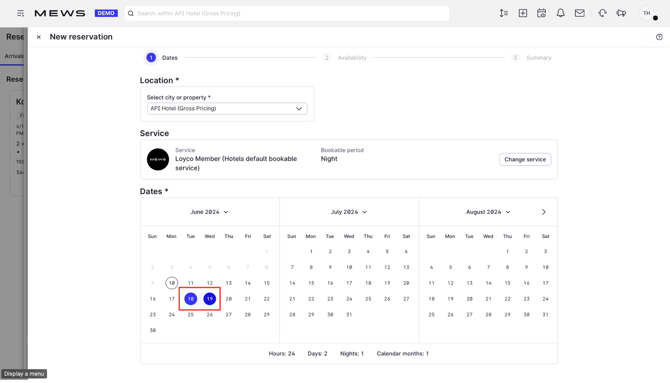
**1. Choose dates and check availability**
In Mews, select the guest's requested dates and check availability as you would for any manual reservation.
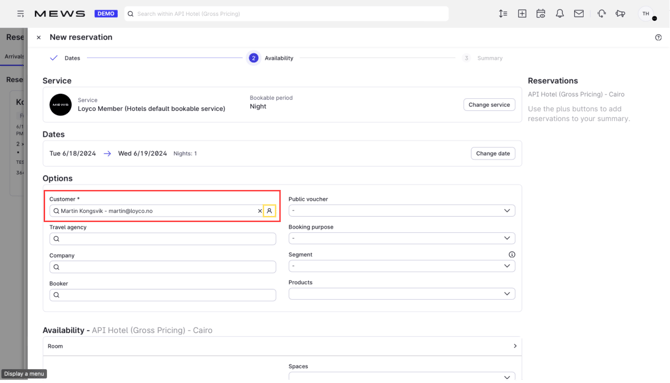
**2. Check if the guest is a member**
Click the **profile icon** to open the guest's profile and verify membership.
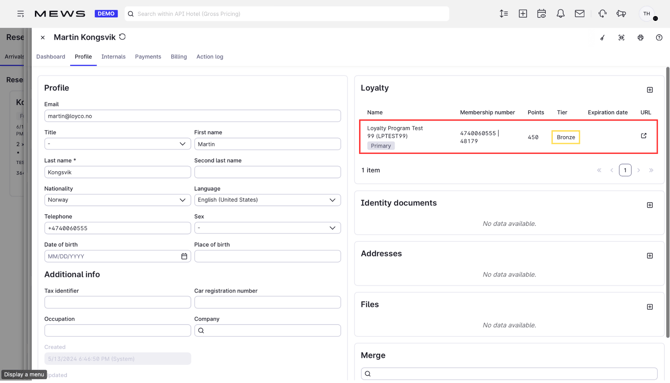
**3. View membership status and level**
The profile shows whether the guest is a member and their member level. Use this to determine which rate group applies.
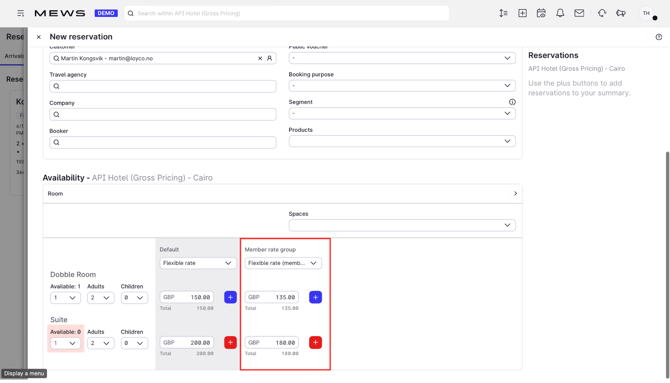
**4. Select the member rate**
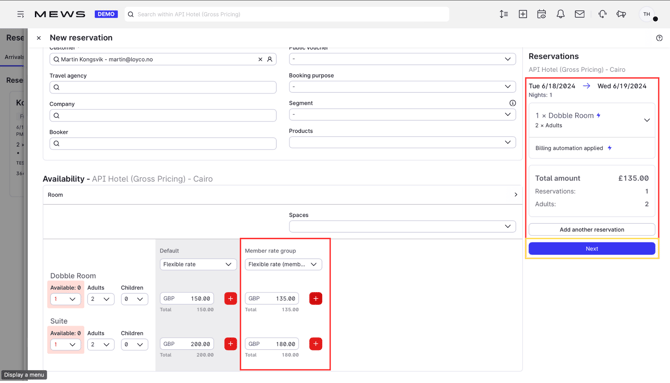
Choose the rate that matches the guest's member level using the **Member Rate Group** dropdown.
**5. Click Next**
Review the reservation details and click **Next**.
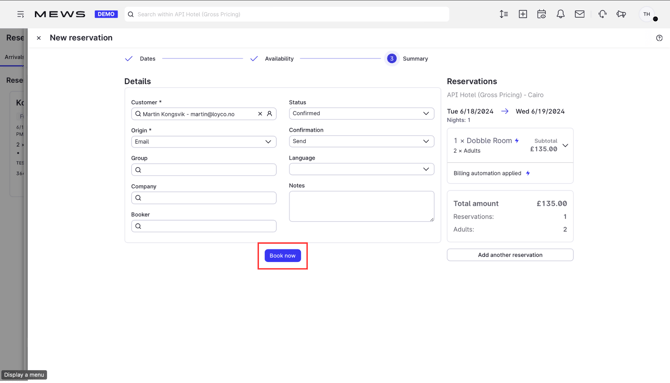
**6. Complete the booking**
Click **Book now** to confirm the reservation. The member rate and discount are now applied to the booking.
**Good to know**
- Always check the member level before selecting the rate. Applying the wrong rate group gives the guest incorrect benefits and pricing.
- Not sure if the guest is a member? See **[Identify members in Mews](https://support.loyco.io/knowledgebase/identify-members-in-mews?hsLang=en).**
[](https://loyco.io)
[mailto:support@Loyco.no](mailto:support@Loyco.no)