---
title: Create product rules for member benefits
description: Set up product rules to automatically apply member benefits like free upgrades, late check-out, and vouchers in bookings and reception operations.
---
[Skip to content](https://support.loyco.io/knowledgebase/create-product-rules-for-member-benefits#main-content)
[](https://support.loyco.io/knowledgebase?hsLang=en)
- [Support](https://support.loyco.io/knowledgebase/contact-us)
Show submenu for Support
- [Book a meeting](https://support.loyco.io/knowledgebase/book-meeting)
- [Contact us](https://support.loyco.io/knowledgebase/contact-us)
- [Program settings](https://www.loyco.io/onboarding)
Open main navigation
Close main navigation
- [Support](https://support.loyco.io/knowledgebase/contact-us)
Show submenu for Support
- [Book a meeting](https://support.loyco.io/knowledgebase/book-meeting)
- [Contact us](https://support.loyco.io/knowledgebase/contact-us)
- [Program settings](https://www.loyco.io/onboarding)
- [Admin login](https://auth.loyco.io/Identity/Account/Login)
[Admin login](https://auth.loyco.io/Identity/Account/Login)
\_
- There are no suggestions because the search field is empty.
1. [Loyco](https://support.loyco.io/knowledgebase?hsLang=en)
2. [Mews](https://support.loyco.io/knowledgebase/mews?hsLang=en)
3. [Setup & configuration](https://support.loyco.io/knowledgebase/mews?hsLang=en#setup-configuration)
# Create product rules for member benefits
## Steps for administrators to set up product rules that automatically add member benefits to bookings.
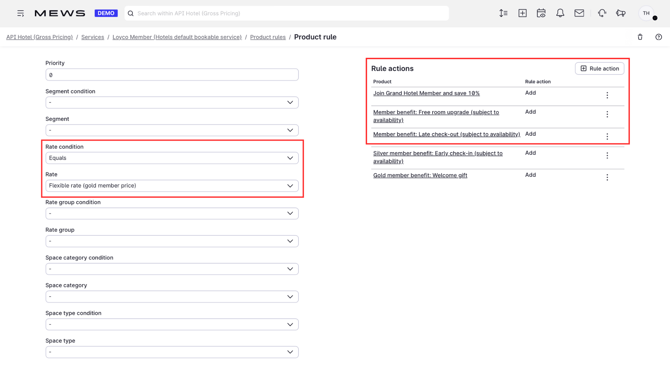
Product rules automatically add benefit products, such as free room upgrade, late check-out, vouchers, or flexible cancellation, to reservations booked on a member rate. The products become visible to the guest in the booking and to the receptionist in the reservation overview. See [Create products for member benefits in Mews](https://support.loyco.io/knowledgebase/create-loyalty-products?hsLang=en) for how to set up the products first.
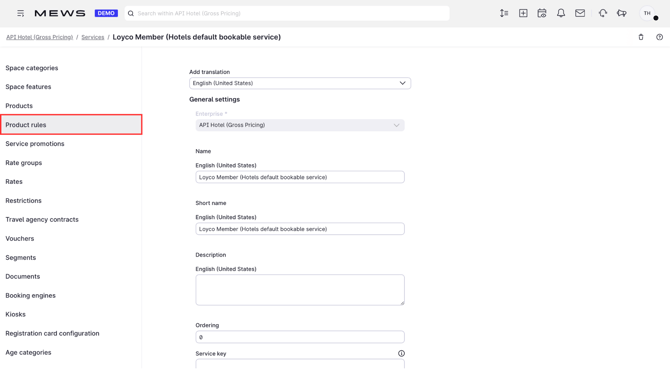
**1. Open Product rules**
In Mews, click **Product rules**.
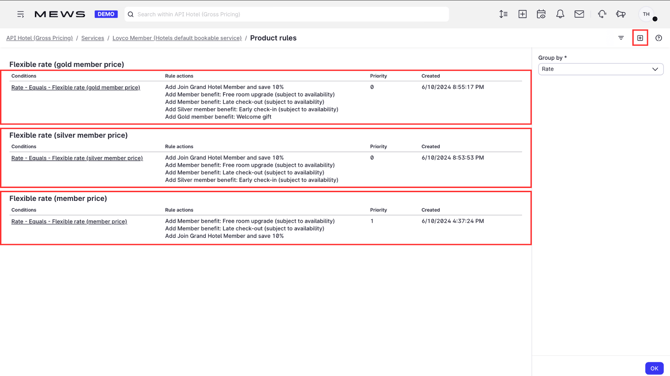
**2. Create a new rule**
Click **+** in the top right corner.
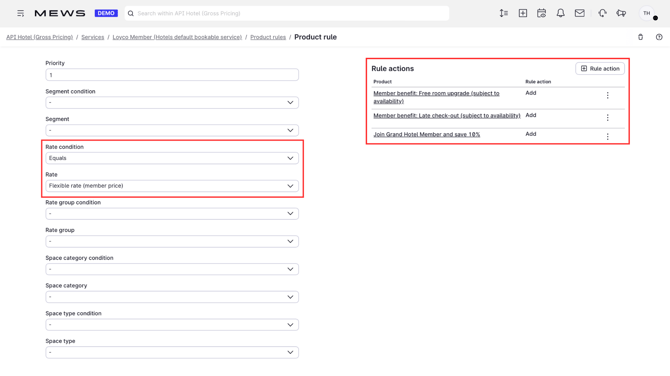
**3. Connect the rule to member rates**
Choose **Rates** and select the member rates the products should be added to. The products are then added automatically to every booking on those rates.
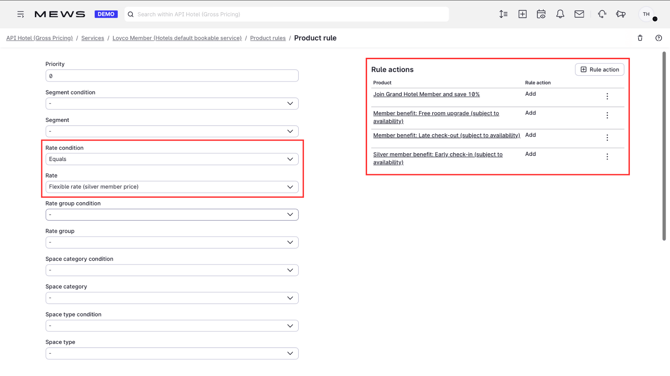
**4. Add benefits per level**
If you have member levels, create rules for each level. Higher levels must also include the benefits from the levels below: a Silver rule includes the non-conflicting standard benefits, and a Gold rule includes both standard and Silver benefits. Alternatively, create duplicate products per level.
**Good to know**
- Product rules are a way to simplify benefit delivery. Instead of reception adding each benefit manually, the right products follow the member rate automatically on every booking.
- Product rules only trigger on the rates they are connected to. If a benefit is missing on a booking, check that the reservation is on a member rate and that the rate is included in the rule.
[](https://loyco.io)
[mailto:support@Loyco.no](mailto:support@Loyco.no)