---
title: How customers register as members in Shopify
description: how customers register as member using loyco in shopify
---
[Skip to content](https://support.loyco.io/knowledgebase/how-customers-register-as-members-in-shopify#main-content)
[](https://support.loyco.io/knowledgebase?hsLang=en)
- [Support](https://support.loyco.io/knowledgebase/contact-us)
Show submenu for Support
- [Book a meeting](https://support.loyco.io/knowledgebase/book-meeting)
- [Contact us](https://support.loyco.io/knowledgebase/contact-us)
- [Program settings](https://www.loyco.io/onboarding)
Open main navigation
Close main navigation
- [Support](https://support.loyco.io/knowledgebase/contact-us)
Show submenu for Support
- [Book a meeting](https://support.loyco.io/knowledgebase/book-meeting)
- [Contact us](https://support.loyco.io/knowledgebase/contact-us)
- [Program settings](https://www.loyco.io/onboarding)
- [Admin login](https://auth.loyco.io/Identity/Account/Login)
[Admin login](https://auth.loyco.io/Identity/Account/Login)
\_
- There are no suggestions because the search field is empty.
1. [Loyco](https://support.loyco.io/knowledgebase?hsLang=en)
2. [Shopify](https://support.loyco.io/knowledgebase/shopify?hsLang=en)
3. [Using Loyco in Shopify](https://support.loyco.io/knowledgebase/shopify?hsLang=en#using-loyco-in-shopify)
# How customers register as members in Shopify
## This article explains how customers register as loyalty members in your Shopify store and how the loyalty programme is presented throughout the shopping experience.
**How it works**
Customers register as loyalty members using Shopify's default account system. Once registered, they get instant access to both their order history and their full loyalty profile — including bonus balance, gift cards, offers, and receipts. The loyalty widget adapts to your store's layout and is placed on key touchpoints to guide customers towards registration and engagement.
## What is the loyalty widget and where does it appear?
The loyalty widget is the primary way customers interact with the loyalty programme in your Shopify store. It is dynamic and adapts to your store's design and layout. The widget is typically placed on:
- The product page — showing how much bonus the customer will earn and how much they can redeem
- The slide-in cart — allowing customers to activate and apply their bonus with one click before checkout
In addition to the widget, you can add custom popups, banners, or sections to your store to promote the loyalty programme and guide customers directly to registration.
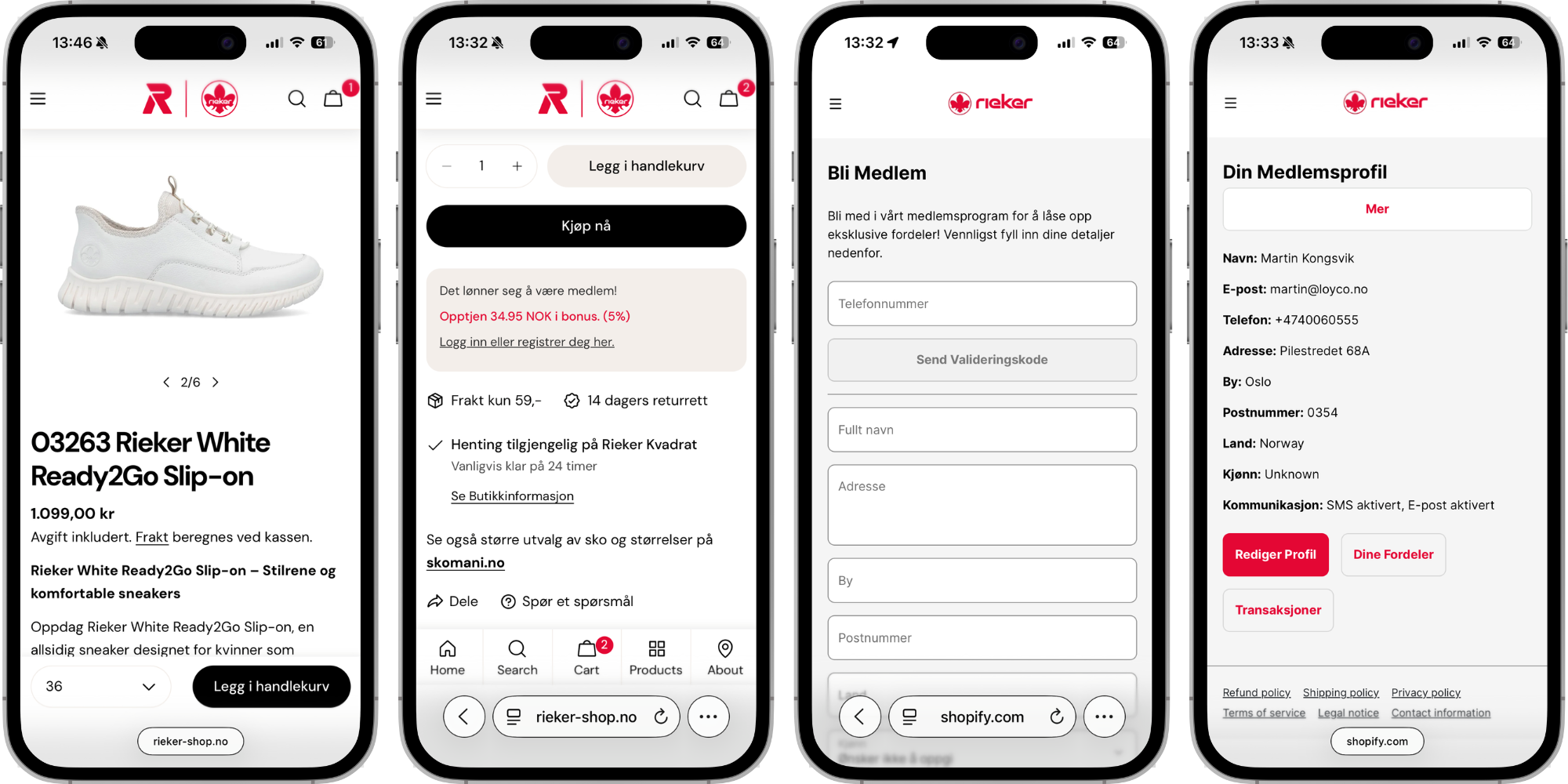
## Step 1 — How does a customer create a Shopify account?
The customer registers using Shopify's standard account creation flow. They enter their name, email address, and phone number to create an account. A validated phone number in the customer's Shopify profile is important — it allows the loyalty membership to work in your physical stores as well as online.
## Step 2 — What can a customer do in their loyalty profile?
Once the account is created and validated, the customer has immediate access to their loyalty profile. From their profile they can:
- View their available bonus balance
- See active gift cards and offers
- Track receipts and bonus earned from past purchases, both online and in-store
- Update personal details and communication preferences
**Step 3 — Customer sees loyalty status on the product page**
When a logged-in member visits a product page, they automatically see their loyalty status and available bonus. The widget displays:
- How much bonus they will earn from purchasing the product
- How much bonus they can redeem as a partial payment on the product
This makes the loyalty programme visible and actionable at the most important moment in the shopping journey — right before the customer decides to buy.
## Step 4 — What loyalty options are available in the slide-in cart?
When the customer adds a product to their cart, the same loyalty information is available in the slide-in cart. The customer can activate and apply their bonus directly from the cart with a single click, without needing to navigate to their profile page.
## Does the loyalty membership work in physical stores?
When a customer has a validated phone number in their Shopify profile, their loyalty membership automatically extends to your physical stores. This means they can earn and redeem bonus points both online and in-store using the same member profile, creating a seamless omnichannel loyalty experience.
[](https://loyco.io)
[mailto:support@Loyco.no](mailto:support@Loyco.no)