---
title: How to buy gift cards in Shopify
description: Find out how customers can purchase Loyco digital gift cards in your Shopify webshop and how the gift card is delivered and forwarded via SMS.
---
[Skip to content](https://support.loyco.io/knowledgebase/how-to-buy-gift-cards-in-shopify#main-content)
[](https://support.loyco.io/knowledgebase?hsLang=en)
- [Support](https://support.loyco.io/knowledgebase/contact-us)
Show submenu for Support
- [Book a meeting](https://support.loyco.io/knowledgebase/book-meeting)
- [Contact us](https://support.loyco.io/knowledgebase/contact-us)
- [Program settings](https://www.loyco.io/onboarding)
Open main navigation
Close main navigation
- [Support](https://support.loyco.io/knowledgebase/contact-us)
Show submenu for Support
- [Book a meeting](https://support.loyco.io/knowledgebase/book-meeting)
- [Contact us](https://support.loyco.io/knowledgebase/contact-us)
- [Program settings](https://www.loyco.io/onboarding)
- [Admin login](https://auth.loyco.io/Identity/Account/Login)
[Admin login](https://auth.loyco.io/Identity/Account/Login)
\_
- There are no suggestions because the search field is empty.
1. [Loyco](https://support.loyco.io/knowledgebase?hsLang=en)
2. [Gift card (retail)](https://support.loyco.io/knowledgebase/gift-card-retail?hsLang=en)
3. [Using digital gift cards with Loyco](https://support.loyco.io/knowledgebase/gift-card-retail?hsLang=en#using-digital-gift-cards-with-loyco)
# How to buy gift cards in Shopify
## This article explains how customers can purchase a Loyco digital gift card in your Shopify webshop and how the gift card is delivered and forwarded to the recipient.
**How it works**
Customers can purchase a gift card in your Shopify webshop just like any other product. No shipping method is required if the gift card is purchased alone. After purchase, the gift card is delivered instantly via SMS — both to the purchaser and, at a scheduled time chosen by the purchaser, to the recipient.
**Step 1 — Find the gift card in the webshop**
The customer navigates to the gift card product page in your Shopify webshop. The gift card is listed as a regular product and is available in a range of preset amounts.
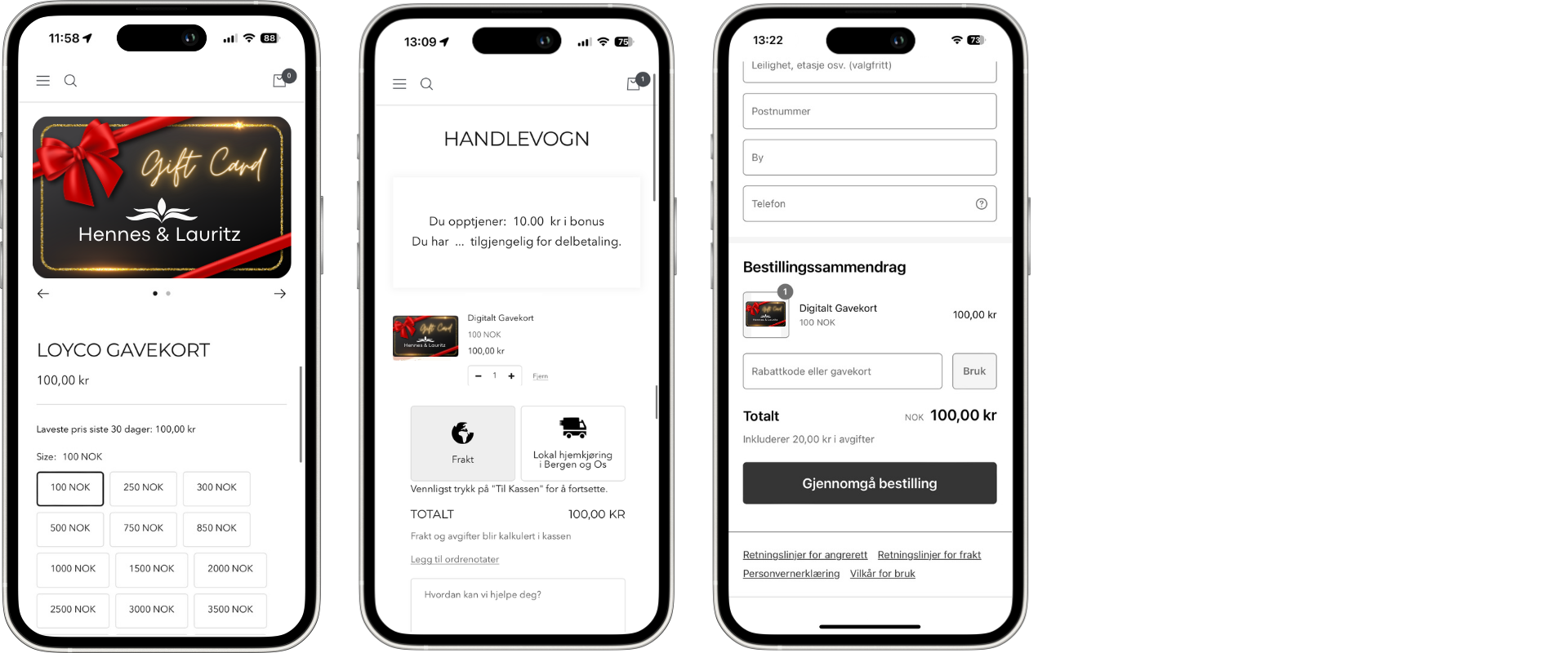
**Step 2 — Select the desired amount**
The customer selects their preferred gift card amount from the available variants. The price updates automatically to reflect the selected amount.
**Step 3 — Add to cart and proceed to checkout**
The customer adds the gift card to their cart and proceeds to checkout. No shipping method is required when purchasing a gift card on its own. The customer completes the checkout and pays using their preferred payment method.
**Step 4 — Purchaser receives the gift card via SMS**
After the purchase is completed, the purchaser receives an SMS with the gift card information. From the SMS, the purchaser can:
- Use the gift card themselves in-store or online
- Forward the gift card as a gift to someone else with a personalised message
- Choose a scheduled delivery time for the recipient
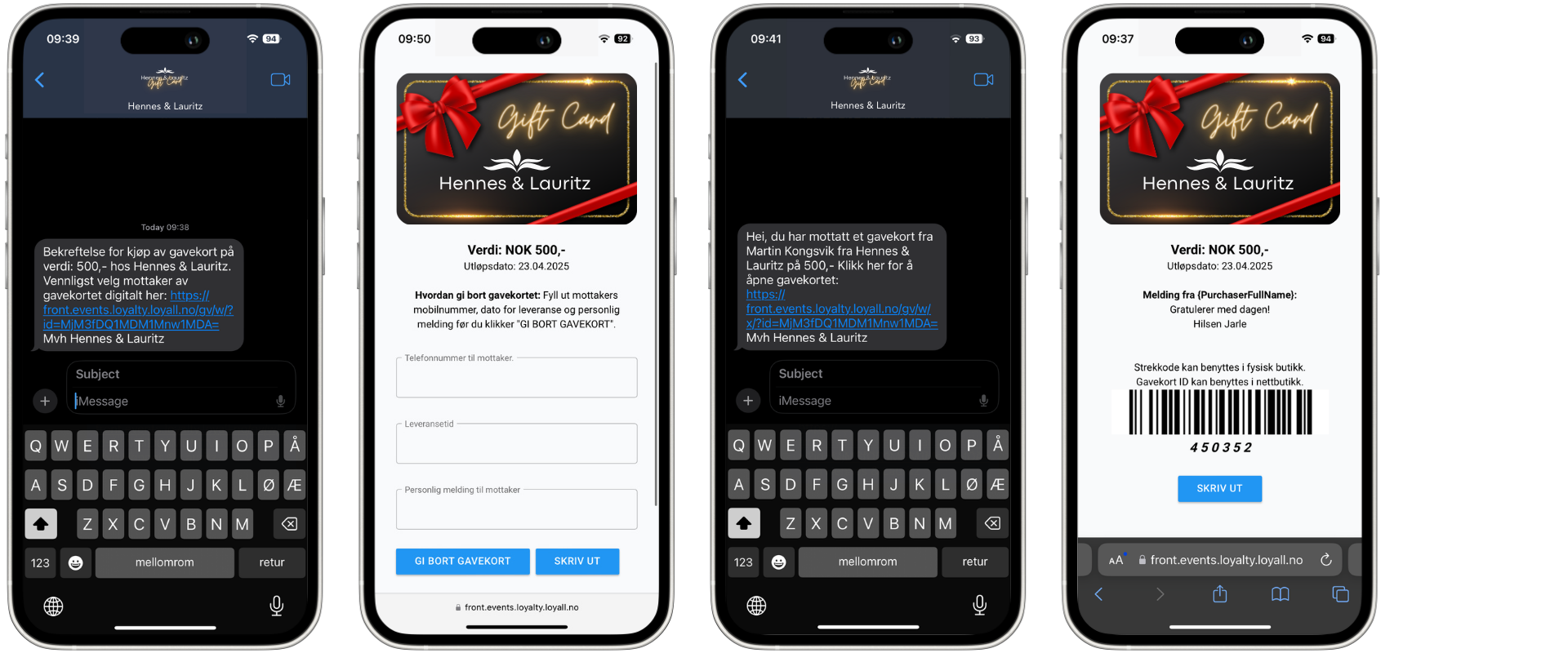
**Step 5 — Recipient receives the gift card via SMS**
If the purchaser chooses to send the gift card as a gift, the recipient receives an SMS at the scheduled time. The SMS includes:
- A personalised message from the purchaser
- A link to open and view the gift card
- Instructions on how to use the gift card both in-store and online
**What the recipient can do with the gift card**
Once the recipient opens the gift card link, they can use it as full or partial payment in your Shopify webshop or in your physical store. For instructions on how to redeem the gift card online, see How to redeem gift cards in Shopify. For instructions on how to redeem in-store, see How to redeem gift cards in Front Systems.
**Things to note**
- No shipping method is required when purchasing a gift card alone in the Shopify webshop — the gift card is delivered digitally via SMS
- The purchaser can choose to use the gift card themselves or forward it as a gift — both options are available directly from the SMS received after purchase
- If the purchaser or recipient does not receive the SMS after purchase, verify that the phone number entered at checkout is correct and includes the correct country dialling code
- Gift cards purchased in the Shopify webshop work the same way as gift cards purchased in-store — they can be redeemed across both channels
[](https://loyco.io)
[mailto:support@Loyco.no](mailto:support@Loyco.no)