---
title: How to navigate the member profile in Shopify
description: how to navigate the member profile with loyco in shopify
---
[Skip to content](https://support.loyco.io/knowledgebase/how-to-navigate-the-member-profile-in-shopify#main-content)
[](https://support.loyco.io/knowledgebase?hsLang=en)
- [Support](https://support.loyco.io/knowledgebase/contact-us)
Show submenu for Support
- [Book a meeting](https://support.loyco.io/knowledgebase/book-meeting)
- [Contact us](https://support.loyco.io/knowledgebase/contact-us)
- [Program settings](https://www.loyco.io/onboarding)
Open main navigation
Close main navigation
- [Support](https://support.loyco.io/knowledgebase/contact-us)
Show submenu for Support
- [Book a meeting](https://support.loyco.io/knowledgebase/book-meeting)
- [Contact us](https://support.loyco.io/knowledgebase/contact-us)
- [Program settings](https://www.loyco.io/onboarding)
- [Admin login](https://auth.loyco.io/Identity/Account/Login)
[Admin login](https://auth.loyco.io/Identity/Account/Login)
\_
- There are no suggestions because the search field is empty.
1. [Loyco](https://support.loyco.io/knowledgebase?hsLang=en)
2. [Shopify](https://support.loyco.io/knowledgebase/shopify?hsLang=en)
3. [Using Loyco in Shopify](https://support.loyco.io/knowledgebase/shopify?hsLang=en#using-loyco-in-shopify)
# How to navigate the member profile in Shopify
## This article explains what customers can see and do from their loyalty member profile in your Shopify store.
**How it works**
The member profile is the central hub for customers to manage their loyalty membership. It is accessible directly from the customer's Shopify account and gives a full overview of bonus balance, benefits, purchase history, and personal settings — all in one place.
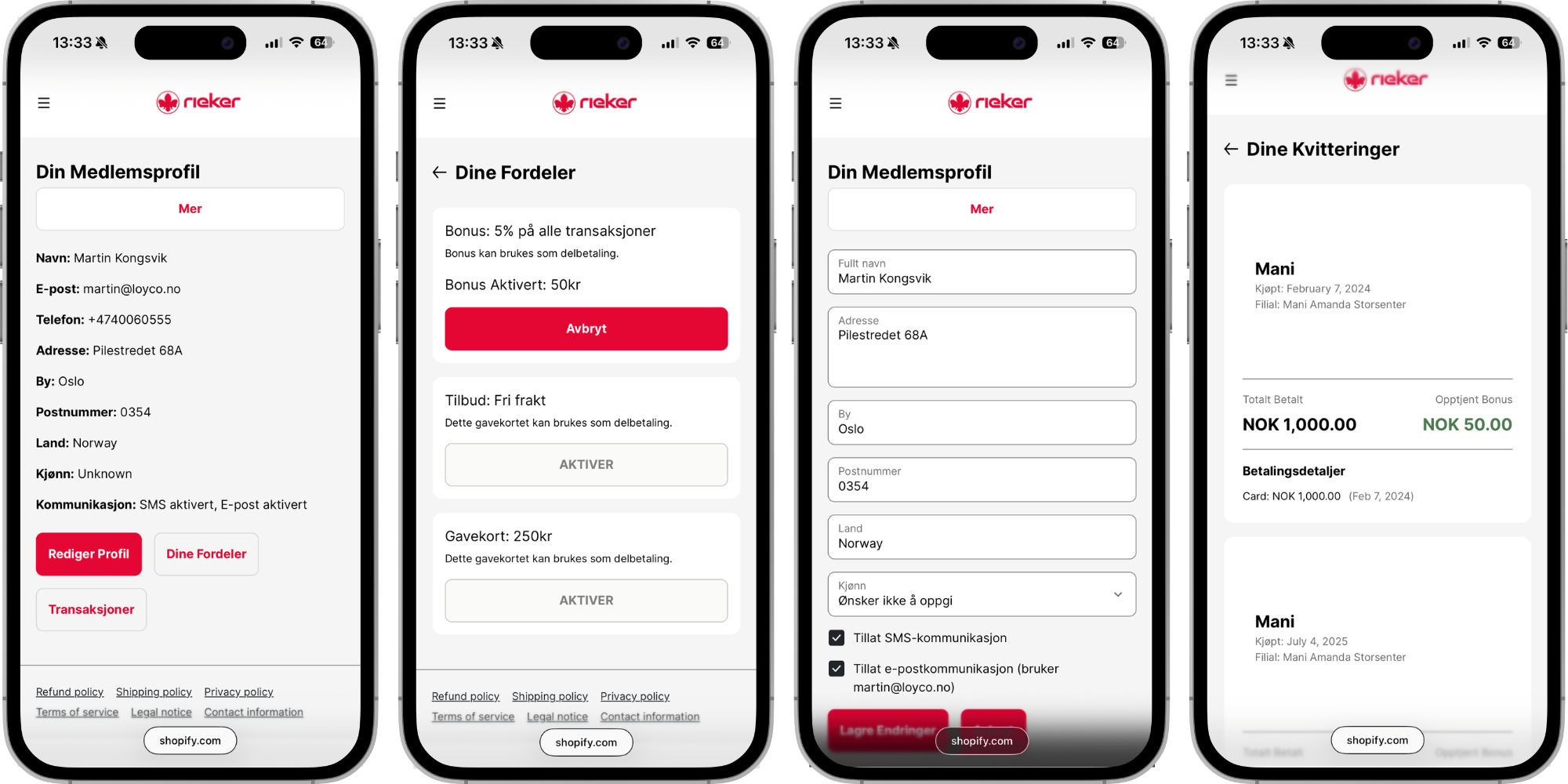
**What customers can see and do in the member profile**
**Bonus balance**
Customers can see their current bonus balance and how much they have earned from past purchases, both online and in-store. The balance is updated automatically after every qualifying purchase.
**Gift cards**
Active gift cards are visible in the member profile. Customers can view the value of each gift card and activate them for use in the Shopify store. Once activated, the gift card value is applied automatically as a discount in the cart.
**Offers and benefits**
Active offers are displayed in the member profile. Offers are non-monetary benefits set up by the store administrator in the Loyco dashboard — such as a free product, a discount on a specific category, or an exclusive member perk. Offers that the customer qualifies for are shown automatically based on their membership level or segment.
**Receipts and purchase history**
Customers can view copies of receipts and track bonus earned from past purchases, both from the online store and from physical store visits. This gives members a complete picture of their loyalty activity across all channels.
**Personal details and communication preferences**
Customers can update their personal information directly from the member profile, including name, email address, and phone number. They can also manage their communication preferences and consent settings from this page.
**Why the member profile matters**
The member profile is where customers engage with the loyalty programme between purchases. A well-configured member profile — with active offers, a visible bonus balance, and clear benefits — gives customers a reason to log in, stay engaged, and come back to your store.
Encouraging customers to check their profile regularly is one of the most effective ways to increase loyalty programme engagement and repeat purchases.
**Things to note**
- The member profile is accessible from the customer's Shopify account — customers must be logged in to view their profile and benefits
- Bonus balance and purchase history are updated automatically after every qualifying purchase — there is no manual step required
- Offers displayed in the member profile are configured by the store administrator in the Loyco dashboard — contact [support@loyco.no](mailto:support@loyco.no) if you need help setting up or updating offers
- A validated phone number in the customer's Shopify profile is required for in-store purchases to be linked to the online member profile
[](https://loyco.io)
[mailto:support@Loyco.no](mailto:support@Loyco.no)