
How it works
Logged-in members automatically see their loyalty status and available bonus balance on the product page and in the slide-in cart. Bonus can be applied as a partial payment with a single click, and the discount is applied immediately in the cart. The member's bonus balance is updated automatically after the redemption — both online and in-store.
Before you start
Make sure the following is in place before attempting to redeem bonus points:
- The customer is logged in to their Shopify account
- The customer is a registered loyalty member with an active member profile
- The customer has an available bonus balance to redeem
If the customer is not yet a member, see How customers register as members in Shopify.
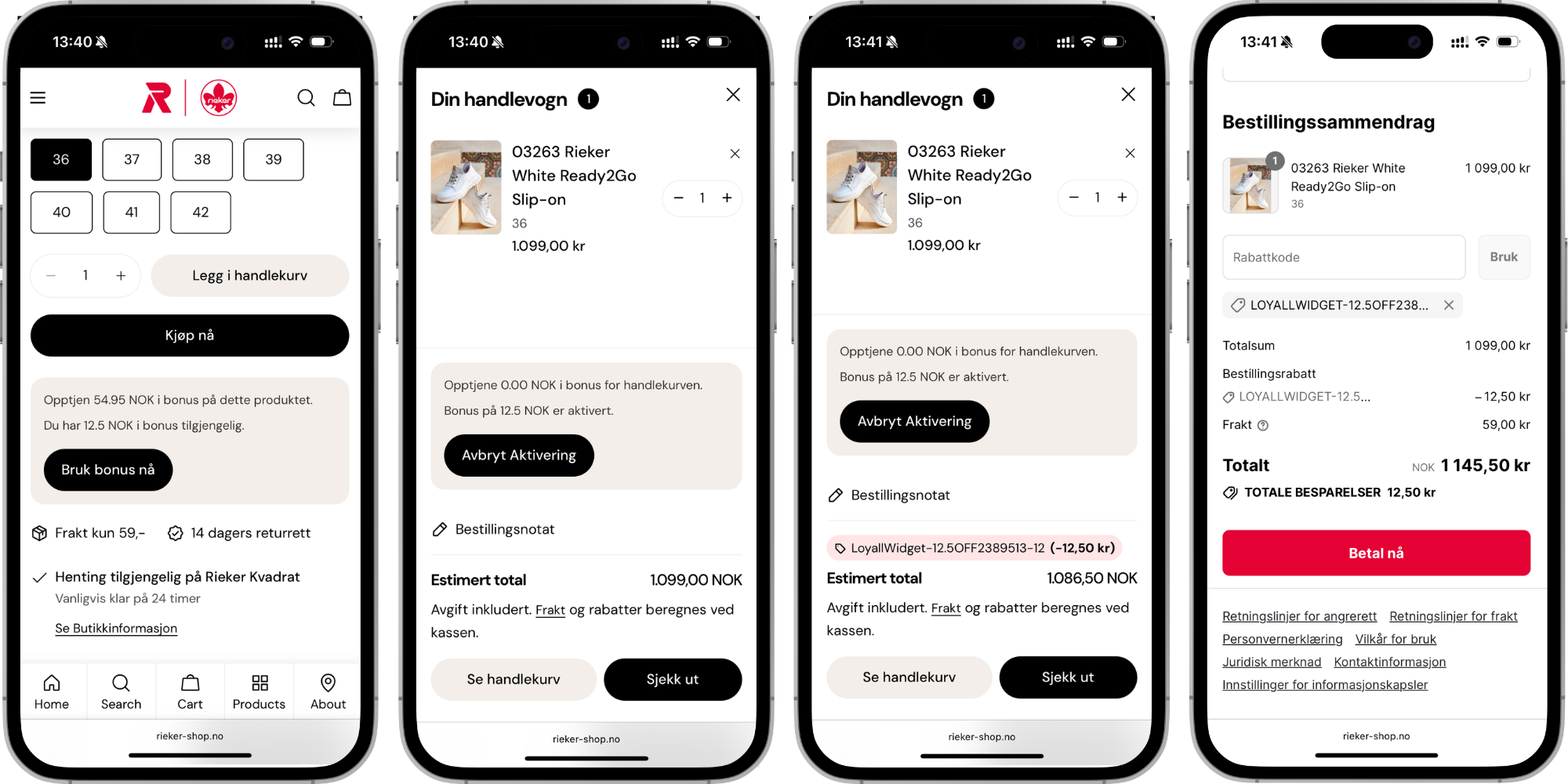
Redeeming bonus from the product page
Step 1 — Open a product page
The logged-in member navigates to a product page in your Shopify store. The loyalty widget is displayed automatically on the product page and shows two pieces of information:
- How much bonus the member will earn from purchasing the product
- How much bonus the member can redeem as a partial payment on the product
Step 2 — Activate the bonus
The member clicks to activate and apply their available bonus. The bonus is applied as a discount and the updated price is shown immediately on the product page before the member adds the item to their cart.
Step 3 — Complete the purchase
The member adds the product to their cart and proceeds to checkout. The bonus discount is visible in the cart summary and carried through to checkout. The member pays the remaining balance by their preferred payment method.
Redeeming bonus from the slide-in cart
Step 1 — Add a product to the cart
The member adds a product to their cart. The slide-in cart opens automatically and displays the loyalty widget alongside the cart contents.
Step 2 — Apply bonus in the slide-in cart
The loyalty widget in the slide-in cart shows the member's available bonus balance and allows them to activate and apply it with a single click. The bonus is applied as a discount and the updated cart total is shown immediately.
Step 3 — Proceed to checkout
The member proceeds to checkout with the bonus discount already applied. The remaining balance is paid by the member's preferred payment method.
What happens after redemption
Once the bonus has been applied and the purchase is completed:
- The redeemed bonus amount is deducted from the member's balance immediately
- The updated bonus balance is visible in the member profile
- The member earns new bonus points on the remaining balance paid after the redemption
- The redemption is recorded in the member's purchase history and visible in the member profile