---
title: How to redeem gift cards in Shopify
description: Learn how members can activate and redeem gift cards directly from their Shopify account page, with the value automatically applied to the cart.
---
[Skip to content](https://support.loyco.io/knowledgebase/how-to-redeem-gift-cards-in-shopify#main-content)
[](https://support.loyco.io/knowledgebase?hsLang=en)
- [Support](https://support.loyco.io/knowledgebase/contact-us)
Show submenu for Support
- [Book a meeting](https://support.loyco.io/knowledgebase/book-meeting)
- [Contact us](https://support.loyco.io/knowledgebase/contact-us)
- [Program settings](https://www.loyco.io/onboarding)
Open main navigation
Close main navigation
- [Support](https://support.loyco.io/knowledgebase/contact-us)
Show submenu for Support
- [Book a meeting](https://support.loyco.io/knowledgebase/book-meeting)
- [Contact us](https://support.loyco.io/knowledgebase/contact-us)
- [Program settings](https://www.loyco.io/onboarding)
- [Admin login](https://auth.loyco.io/Identity/Account/Login)
[Admin login](https://auth.loyco.io/Identity/Account/Login)
\_
- There are no suggestions because the search field is empty.
1. [Loyco](https://support.loyco.io/knowledgebase?hsLang=en)
2. [Shopify](https://support.loyco.io/knowledgebase/shopify?hsLang=en)
3. [Using Loyco in Shopify](https://support.loyco.io/knowledgebase/shopify?hsLang=en#using-loyco-in-shopify)
# How to redeem gift cards in Shopify
## This article explains how members can activate and redeem gift cards directly from their account page in your Shopify store.
**How it works**
Members can activate available gift cards directly from their loyalty member profile in Shopify. Once activated, the gift card value is automatically applied to the cart as a discount and the redeemed amount is instantly updated in the member profile — both online and in-store.
**Before you start**
Make sure the following is in place before attempting to redeem a gift card:
- The customer is logged in to their Shopify account
- The customer is a registered loyalty member with an active member profile
- The customer has an active gift card available in their member profile
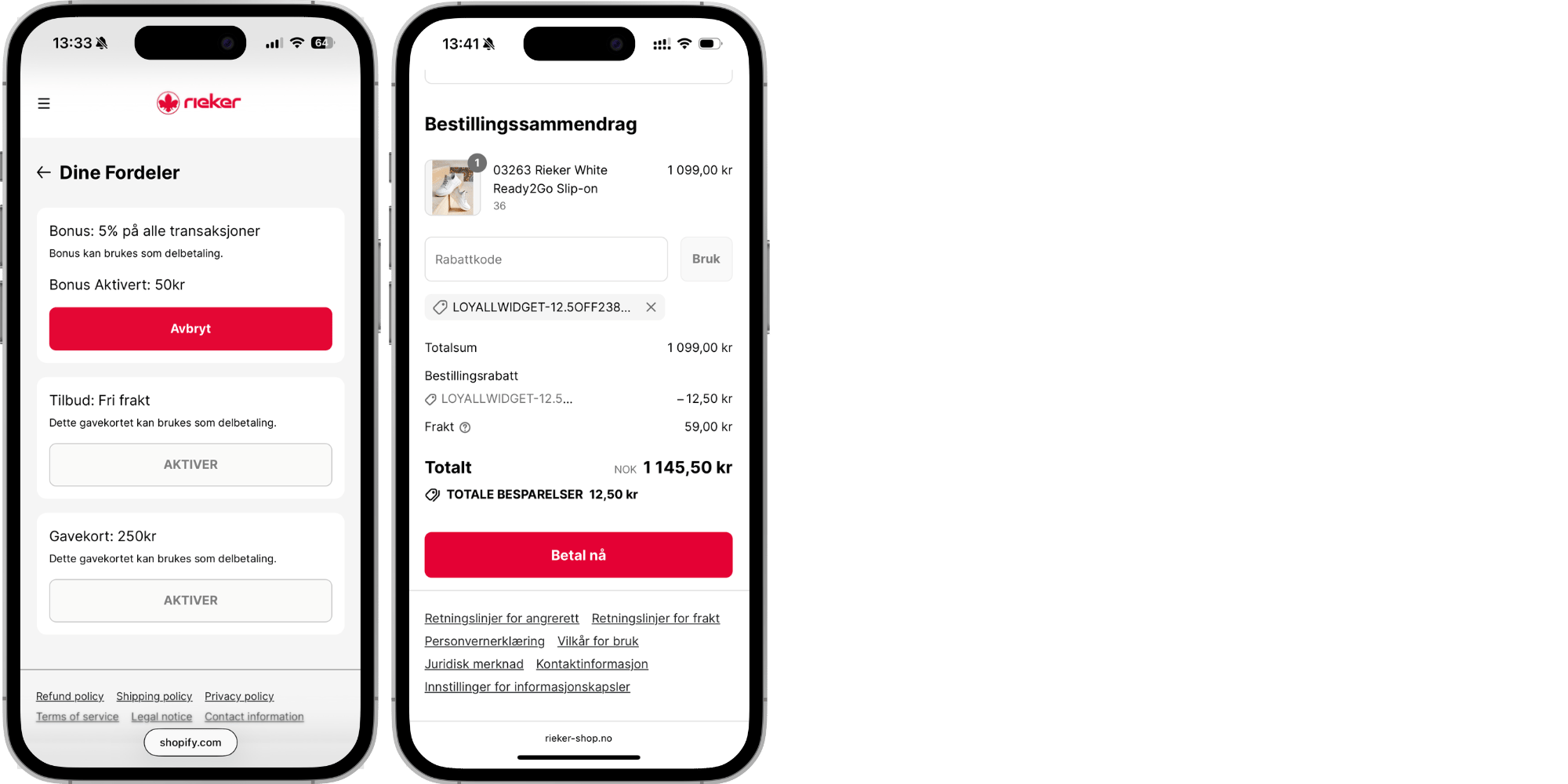
**Step 1 — Open the member profile**
The member logs in to their Shopify account and navigates to their loyalty member profile. Active gift cards are listed under the gift cards section of the profile.
**Step 2 — Select the gift card to activate**
The member locates the gift card they wish to redeem in their profile. The gift card value and any relevant details are displayed before activation. The member selects the gift card and clicks to activate it.
**Step 3 — Gift card is applied to the cart**
Once activated, the gift card value is automatically applied to the cart as a gift card discount. The member does not need to enter a code manually — the activation happens directly from the member profile.
**Step 4 — Proceed to checkout**
The member proceeds to checkout with the gift card discount already applied. The updated cart total reflecting the gift card deduction is visible in the cart summary. The member pays any remaining balance by their preferred payment method.
**Step 5 — Verify in the member profile**
After the purchase is completed, the redeemed gift card amount is instantly updated in the member profile. If the gift card has been fully redeemed it will no longer appear as active. If only a partial amount was used, the remaining balance is displayed in the profile.
[](https://loyco.io)
[mailto:support@Loyco.no](mailto:support@Loyco.no)