---
title: Redeeming Bonus Points in VisBook
description: Learn how reception can redeem a guest's bonus points as partial payment directly from VisBook PMS in a few simple steps.
---
[Skip to content](https://support.loyco.io/knowledgebase/redeeming-bonus-points-in-visbook#main-content)
[](https://support.loyco.io/knowledgebase?hsLang=en)
- [Support](https://support.loyco.io/knowledgebase/contact-us)
Show submenu for Support
- [Book a meeting](https://support.loyco.io/knowledgebase/book-meeting)
- [Contact us](https://support.loyco.io/knowledgebase/contact-us)
- [Program settings](https://www.loyco.io/onboarding)
Open main navigation
Close main navigation
- [Support](https://support.loyco.io/knowledgebase/contact-us)
Show submenu for Support
- [Book a meeting](https://support.loyco.io/knowledgebase/book-meeting)
- [Contact us](https://support.loyco.io/knowledgebase/contact-us)
- [Program settings](https://www.loyco.io/onboarding)
- [Admin login](https://auth.loyco.io/Identity/Account/Login)
[Admin login](https://auth.loyco.io/Identity/Account/Login)
\_
- There are no suggestions because the search field is empty.
1. [Loyco](https://support.loyco.io/knowledgebase?hsLang=en)
2. [VisBook](https://support.loyco.io/knowledgebase/visbook?hsLang=en)
3. [Using Loyco in VisBook](https://support.loyco.io/knowledgebase/visbook?hsLang=en#using-loyco-in-visbook)
# Redeeming Bonus Points in VisBook
**How it works**
Guests automatically earn Loyall bonus points based on a percentage of their total paid amount. Points are assigned after checkout and can be redeemed on future stays. Receptionists can redeem points on behalf of a guest directly from the booking page in VisBook, without leaving the PMS.
**Before you start**
Make sure the following is in place before attempting to redeem bonus points:
- The Loyco integration is active in VisBook
- Loyco is set up as a payment method in VisBook accounting settings
- The guest is confirmed as a member — the Loyall button in the booking is clickable and a member icon is visible
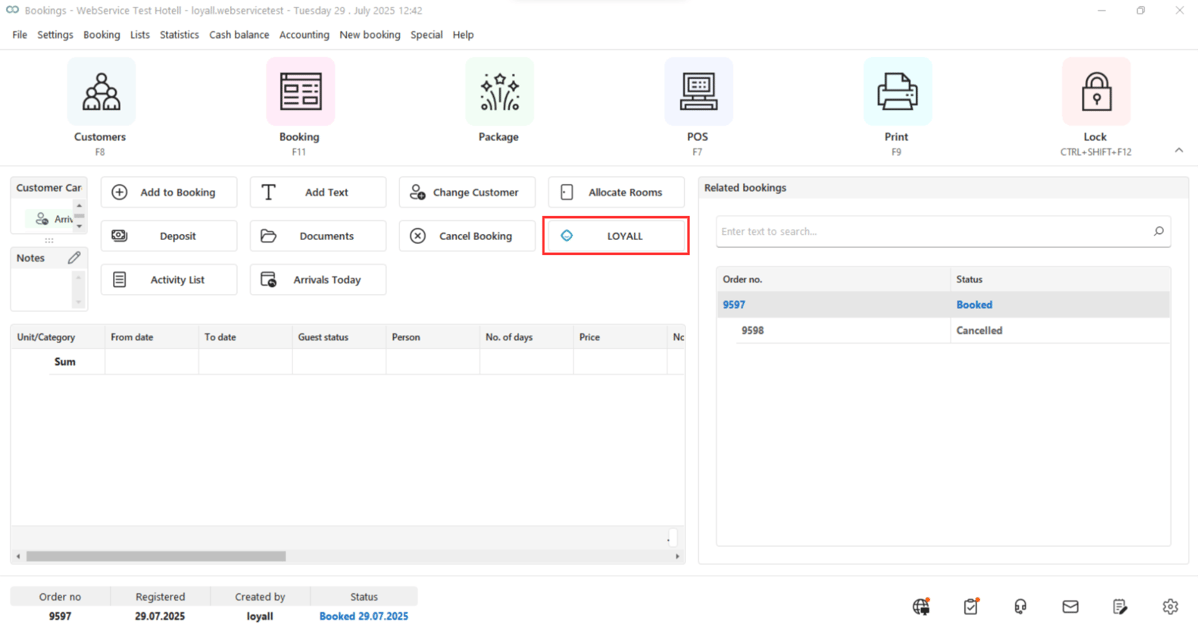
1\. Click the "LOYALL" button to view member benefits and redeem bonus points.
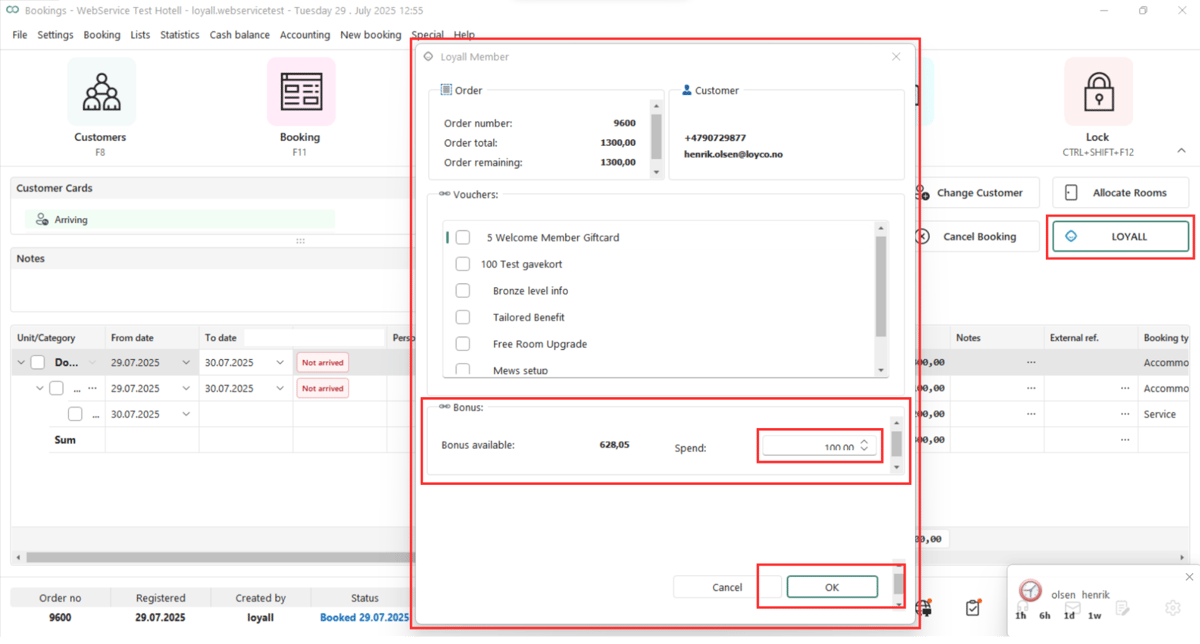
2\. A popup opens showing the Loyall Member page. It displays the guest's available benefits under \*\*Vouchers\*\* and their current bonus balance. Enter the amount to redeem in the \*\*Spend\*\* field and click \*\*OK\*\*.
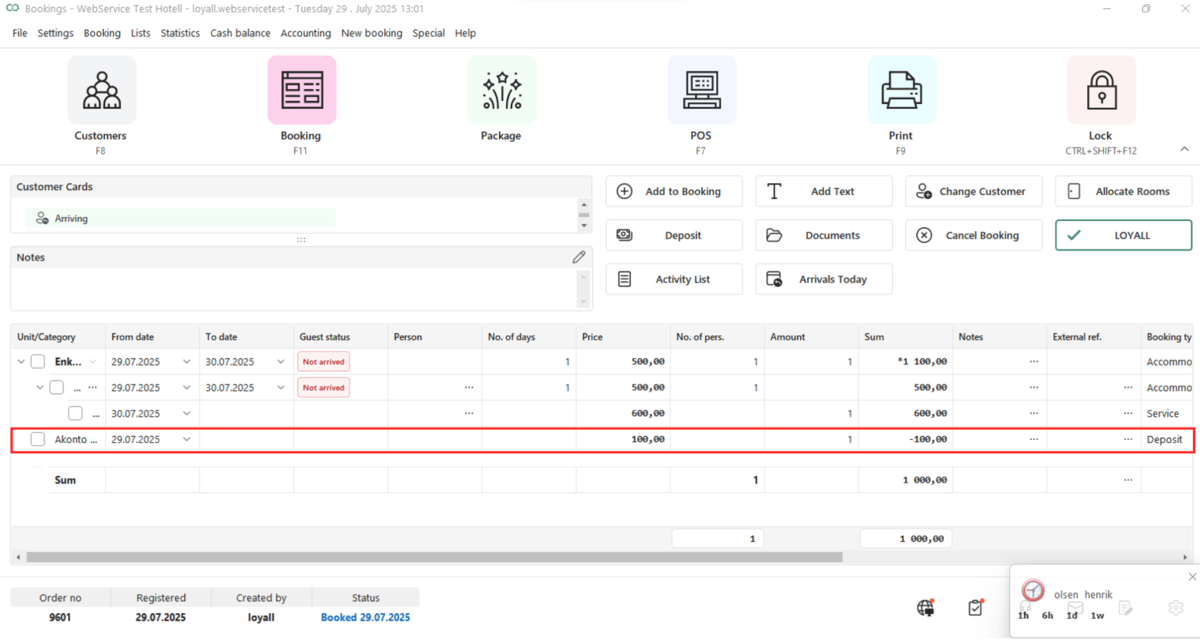
3\. After clicking OK, the amount is sent to VisBook as a partial payment labeled "Akonto" and deducted from the guest's total.
**Useful links**
- Loyall Admin Portal: [portal.loyco.io](https://portal.loyco.io)
- Loyall Help Center: [support.loyco.io](https://support.loyco.io?hsLang=en)
- Book a meeting: [support.loyco.io/knowledgebase/book-meeting](https://support.loyco.io/knowledgebase/book-meeting?hsLang=en)
[](https://loyco.io)
[mailto:support@Loyco.no](mailto:support@Loyco.no)