
Redeeming member benefits in Mews
Steps for receptionists to redeem member benefits in Member Insight and deliver them to the guest.
1. Open Member Insight
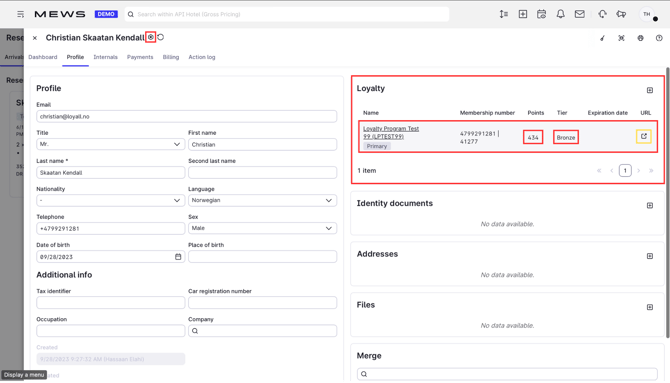
In Mews, open the guest's customer card and go to the Loyalty tab. Click the URL shown there.
Member Insight opens in a new window and automatically searches for the member using the number from the customer card. No manual lookup is needed.
2. Find the benefit
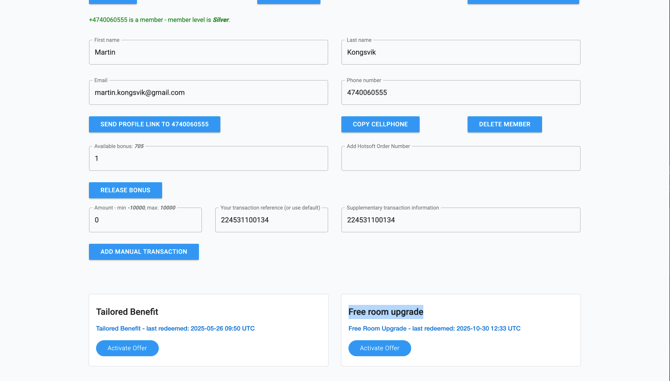
The member's available benefits are shown in Member Insight, in the same way as vouchers. Examples include free room upgrade, early check-in, and late check-out.
Before redeeming, check that the benefit can actually be delivered. For example, confirm that a higher room category is available before redeeming a room upgrade.
3. Redeem the benefit
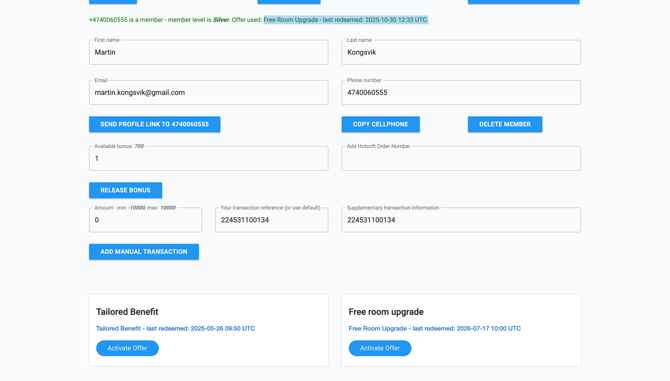
Redeem the benefit in Member Insight. It is marked as used on the member's profile immediately, and a confirmation message appears at the top of the screen.
4. Deliver the benefit in Mews
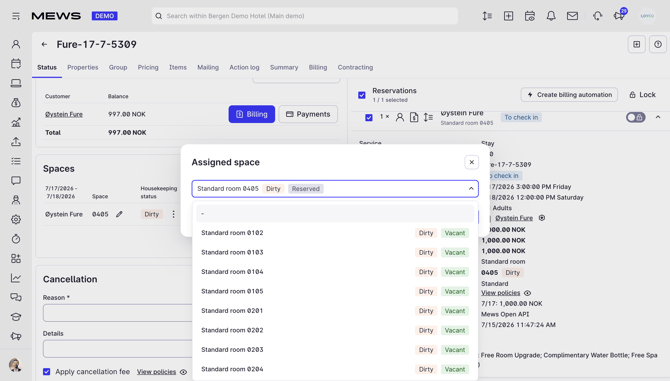
The benefit is not applied in Mews automatically. Complete the action the benefit describes:
- Room upgrade: move the reservation to a higher room category at no extra charge.
- Early check-in or late check-out: adjust the arrival or departure time on the reservation.
What needs to be done varies per benefit. Follow the benefit description in Member Insight.
Good to know
- Vouchers are redeemed at full value. Partial redemption is not possible.
- The voucher is spent the moment you release it. Only redeem after the guest has confirmed they want to use it.
- Do not forget step 4. The discount must be added manually in Mews, otherwise the guest is charged full price even though the voucher is used.