
Redeeming member bonuses in Mews
Steps for receptionists to access member benefits via the Loyalty tab in Mews and use bonus points as partial payment.
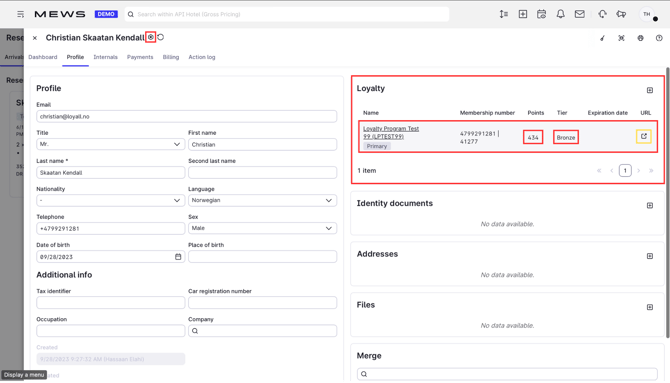
In Mews, open the guest's customer card and go to the Loyalty tab. Click the URL shown there.
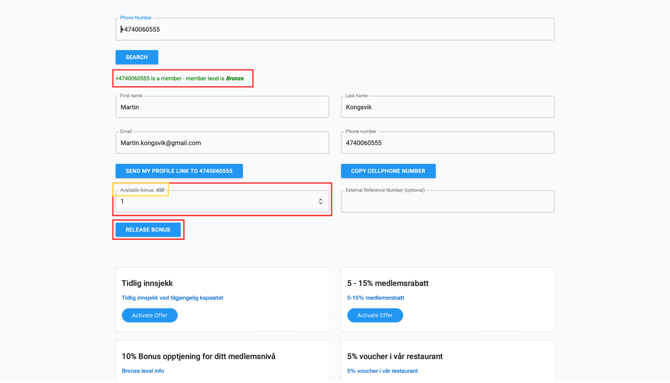
Member Insight opens in a new window and automatically searches for the member using the number from the customer card. No manual lookup is needed.
The member's current balance is shown in the Available bonus field.
To redeem, enter the amount the guest wants to use in the input field and click Release bonus.
The balance updates immediately. For example, a balance of 450 becomes 449 after redeeming NOK 1.00.
A confirmation message appears at the top of the screen: "Bonus amount of NOK 1.00 used."
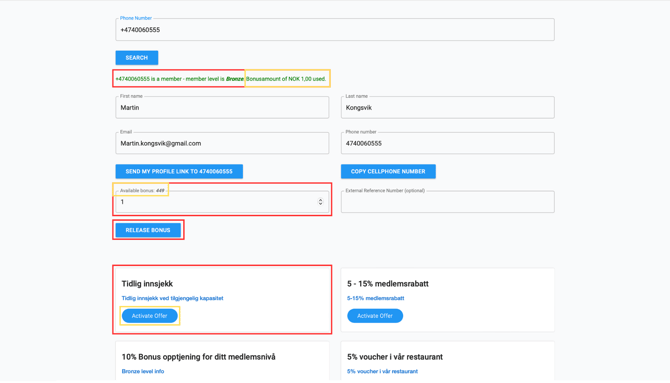
The redeemed amount is automatically posted in Mews as Loyalty points and appears as a discount on the guest's receipt. No further action is required.
.png?width=670&height=384&name=Grand%20Hotel%20(1920%20x%201100%20px).png)
Good to know
- The bonus amount is deducted from the member's balance the moment you click Release bonus. Only release the amount the guest has confirmed.
- If the balance does not update in the billing section, refresh Mews before trying again.
- Released a bonus by mistake? The posting can be reversed in Loyco Admin. View how to here. Note: this requires admin access.