---
title: "Trip Planner: enhance your stay and book activities"
description: "Trip Planner: enhance your stay and book activities"
---
[Skip to content](https://support.loyco.io/knowledgebase/trip-planner-enhance-your-stay-and-book-activities#main-content)
[](https://support.loyco.io/knowledgebase?hsLang=en)
- [Support](https://support.loyco.io/knowledgebase/contact-us)
Show submenu for Support
- [Book a meeting](https://support.loyco.io/knowledgebase/book-meeting)
- [Contact us](https://support.loyco.io/knowledgebase/contact-us)
- [Program settings](https://www.loyco.io/onboarding)
Open main navigation
Close main navigation
- [Support](https://support.loyco.io/knowledgebase/contact-us)
Show submenu for Support
- [Book a meeting](https://support.loyco.io/knowledgebase/book-meeting)
- [Contact us](https://support.loyco.io/knowledgebase/contact-us)
- [Program settings](https://www.loyco.io/onboarding)
- [Admin login](https://auth.loyco.io/Identity/Account/Login)
[Admin login](https://auth.loyco.io/Identity/Account/Login)
\_
- There are no suggestions because the search field is empty.
1. [Loyco](https://support.loyco.io/knowledgebase?hsLang=en)
2. [Member Portal](https://support.loyco.io/knowledgebase/member-portal?hsLang=en)
3. [Using the Member Portal](https://support.loyco.io/knowledgebase/member-portal?hsLang=en#using-the-member-portal)
# Trip Planner: enhance your stay and book activities
## Steps for a member to add hotel extras with points and book local activities.
The **Trip Planner** tab helps a member build out an upcoming stay. It shows the stay and its weather forecast, a set of hotel extras that can be added with points, and a list of local activities. The extras are drawn directly from the hotel's setup in Mews, so what the member sees always matches what the hotel offers.
Your stay and the weather
At the top, the member selects the relevant stay from the hotel and date dropdown. Alongside it, a weather panel shows the forecast for the stay dates, so the member can plan around the conditions.
**Enhance your stay**
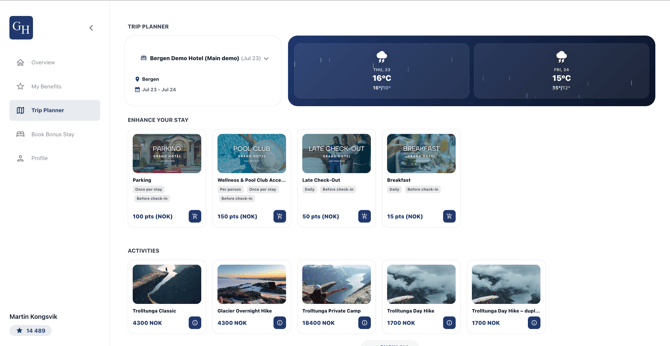
The **Enhance your stay** section shows add-on products such as parking, wellness and pool access, late check-out, and breakfast. Each card shows how the product applies, for example once per stay, daily, or per person, when it must be requested, for example before check-in, and its cost in points.
These products come directly from Mews. The Trip Planner is connected to the standard Mews products for the hotel and pulls their details, including name, price, availability, and how they apply, straight from Mews. There is nothing to maintain separately, and the list always reflects the hotel's Mews configuration.
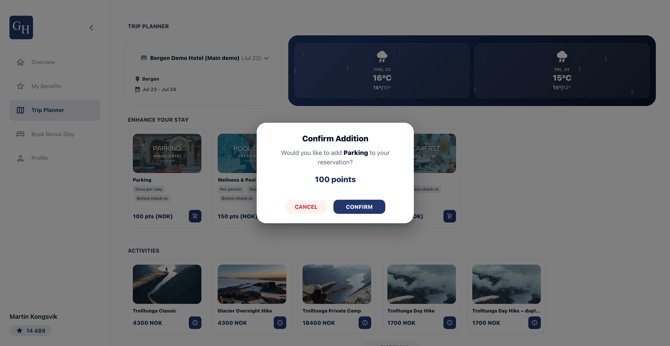
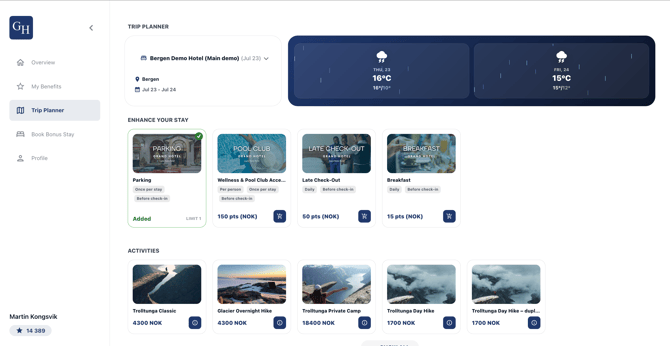
To add an extra, select the cart icon on its card, then select **Confirm** in the confirmation dialog. The points are deducted from the balance and the card is marked **Added**. Some products are limited, shown as a limit on the card, so they can only be added a set number of times.
**1. View the extra.** Select the cart icon on the product card to open it.
**2. Confirm the addition.** A dialog opens showing the product and its cost in points. Select **Confirm** to add it, or **Cancel** to go back.
**3. See it confirmed.** The card is marked **Added** on the Trip Planner and the points are deducted from the balance.
**Activities**
The **Activities** section lists local experiences and gear, such as guided hikes and equipment rentals, priced in NOK.
Booking an activity takes two steps:
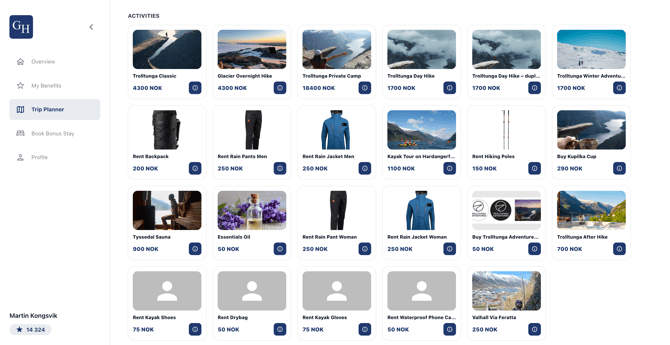
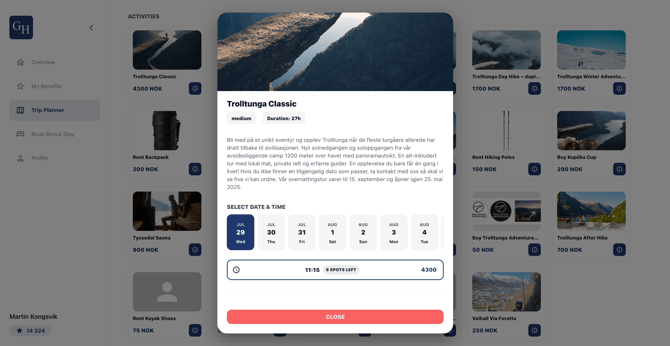
**1. Choose a date and time.** Select the info icon on an activity to open its details, including description, difficulty, and duration. Under **Select date & time**, pick a date and an available time slot, each showing the spots left and the price.
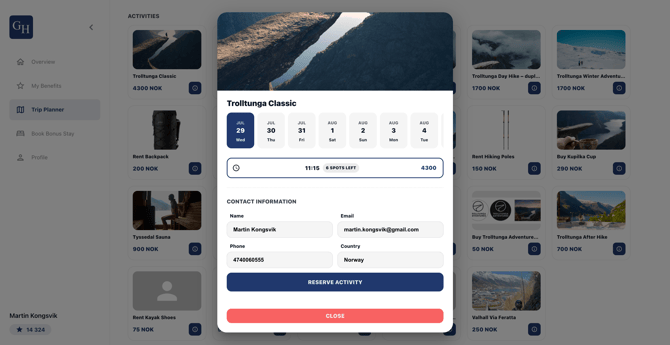
**2. Reserve the activity.** Review the **Contact information**, pre-filled from your profile, and select **Reserve activity**.
Activities require an integration with an activity provider. They are not part of the standard delivery, but an optional extension. When no activity provider is integrated for a hotel, this section is not shown.
Good to know
- **Extras come from Mews.** The Enhance your stay products, their prices, availability, and how they apply are pulled directly from the hotel's standard Mews products. Changes made in Mews flow through to the Trip Planner automatically.
- **Extras are paid with points.** The cost is shown in points and deducted from the balance as soon as the addition is confirmed.
- **Some extras are limited.** A card may cap how many times a product can be added, for example once per stay.
- **Activities are an optional extension.** They rely on an integration with an activity provider and are not included in the standard delivery. Activities are priced in NOK and reserved through the provider, separately from points-based extras.
- **Contact details are pre-filled.** When reserving an activity, the member's name, email, phone, and country are carried over from their profile.
- **Branding varies by hotel.** Each portal carries its own logo, background image, colours, and configuration. The extras and activities available depend on the hotel's Mews setup and any provider integration.
[](https://loyco.io)
[mailto:support@Loyco.no](mailto:support@Loyco.no)