---
title: Understand the Analytics dashboard
description: Analytics dashboard
---
[Skip to content](https://support.loyco.io/knowledgebase/understand-the-analytics-dashboard#main-content)
[](https://support.loyco.io/knowledgebase?hsLang=en)
- [Support](https://support.loyco.io/knowledgebase/contact-us)
Show submenu for Support
- [Book a meeting](https://support.loyco.io/knowledgebase/book-meeting)
- [Contact us](https://support.loyco.io/knowledgebase/contact-us)
- [Program settings](https://www.loyco.io/onboarding)
Open main navigation
Close main navigation
- [Support](https://support.loyco.io/knowledgebase/contact-us)
Show submenu for Support
- [Book a meeting](https://support.loyco.io/knowledgebase/book-meeting)
- [Contact us](https://support.loyco.io/knowledgebase/contact-us)
- [Program settings](https://www.loyco.io/onboarding)
- [Admin login](https://auth.loyco.io/Identity/Account/Login)
[Admin login](https://auth.loyco.io/Identity/Account/Login)
\_
- There are no suggestions because the search field is empty.
1. [Loyco](https://support.loyco.io/knowledgebase?hsLang=en)
2. [Get started](https://support.loyco.io/knowledgebase/get-started?hsLang=en)
# Understand the Analytics dashboard
## Gain insights with the analytics dashboard
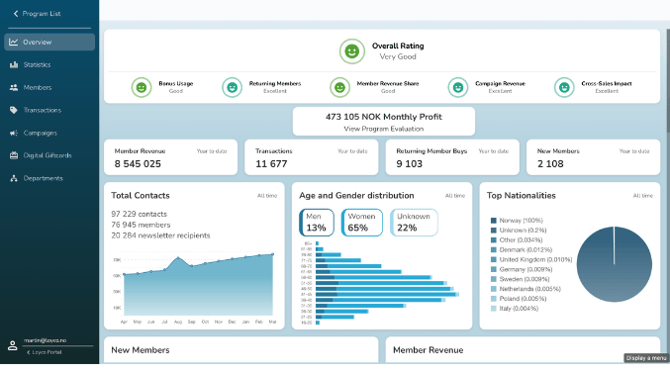
The analytics dashboard provides a centralized hub for tracking key metrics—calculated based on posting dates—across member activity, transactions, campaigns, and more. Use the dashboard to analyze trends, monitor member engagement, and evaluate campaign performance.
**Analytics dashboard**
The analytics dashboard is divided into the following sections: - \*\*Overview\*\* – A high-level summary of your program's performance. - \*\*Statistics\*\* – Detailed data breakdowns and trend charts. - \*\*Members\*\* – Insights into member enrollment, activity, and retention. - \*\*Transactions\*\* – A log of points earned, redeemed, and adjusted. - \*\*Campaigns\*\* – Performance metrics for your active and past campaigns. - \*\*Digital Gift Cards\*\* – Tracking for issued and redeemed digital gift cards. - \*\*Departments\*\* – Activity and performance split by department. New sections and insights are added regularly to enhance reporting capabilities. To stay informed about new additions, check the product changelog or contact your account manager.
➡️ Want to customise your view? See [Tailor Your Dashboard](https://support.loyco.io/knowledgebase/tailor-your-dashboard?hsLang=en) for step-by-step instructions.[](https://support.loyco.io/knowledgebase/tailor-your-dashboard?hsLang=en)
[](https://loyco.io)
[mailto:support@Loyco.no](mailto:support@Loyco.no)